Decide If / Decision
Evaluate conditions and continue through a true or false path.
Create your application's logic visually: make decisions, retrieve information, perform calculations, update data, repeat actions, and send results.
The Business Process Designer is UIWDev's visual designer. You connect steps, decisions, and loops in an easy-to-understand flow. That flow becomes a real process inside your application.
Choose an option, complete its settings, and connect it to the next step.
Evaluate conditions and continue through a true or false path.
Get the information the process needs.
Sum, count, average, and find minimum or maximum values.
Add new records and keep the result available for later steps.
Change the correct data when the specified conditions are met.
Run actions for every record in a collection.
Repeat a section from a starting value to an ending value.
Assign the next number to invoices, orders, or documents.
Generate and send information using UIWDev reports.
Clearly mark where each path in the process ends.
Each card represents a step. The lines show how the process moves forward and what happens for each result.
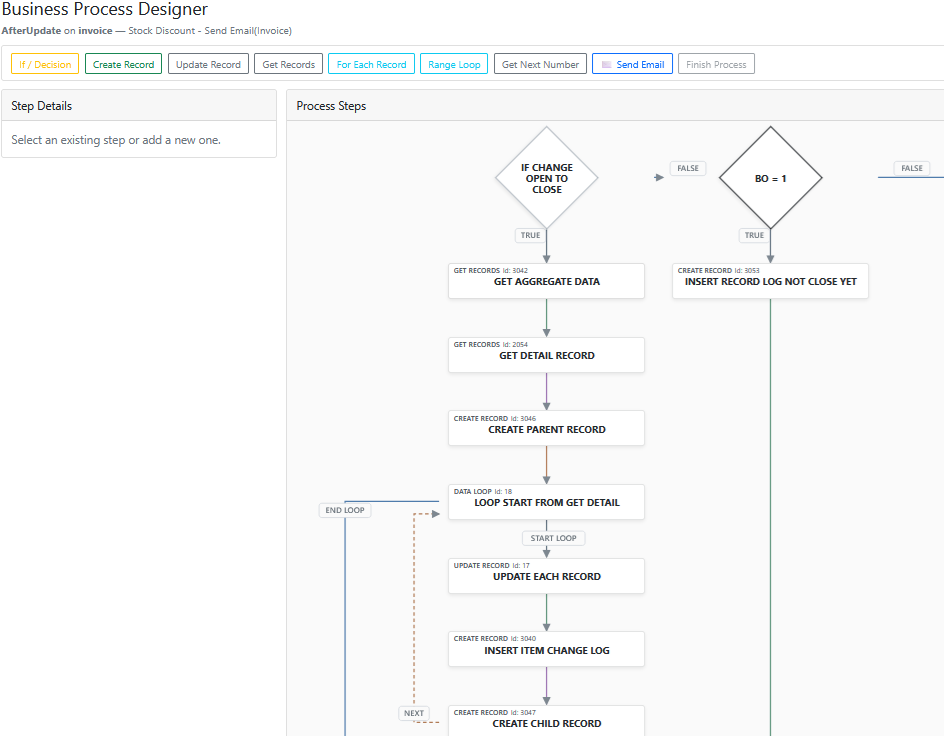
UIWDev BPD turns that knowledge into visual automation.